Streaming video with WebCodecs
There are many ways to stream video over the internet, and of all the ways to deal with video streaming in the browser (<video>, MSE, WebRTC), WebCodecs provides the lowest level control.
Emerging technologies like Media Over Quic use WebCodecs to provide lower latency and higher scalability than with previous options.
Unlike a transcoding pipeline, where it’s pretty clear cut what needs to be done, how you would build a video-streaming application depends entirely on what you are trying to do.
Here are just a few kinds of applications with some form of video streaming:
- An application to watch live sports broadcasts
- Recording software to stream your webcam to multiple social-media live-streaming platforms
- A webinar tool where a few hosts stream content to many attendees
Each would have a different architecture, and for each there might be multiple ways to accomplish the same thing, so the choice of WebCodecs vs MSE vs WebRTC etc.. becomes a design choice.
To make this manageable, I’ll focus on how to do the following with WebCodecs:
- Stream video from a browser to a browser (e.g. video conferencing)
- Stream video from a browser to a server (e.g. recording studio)
- Stream video from a server to a browser (e.g. live broadcast)
I’ll then provide a quick overview of the alternatives (WebRTC, MSE) and include some real world case studies of streaming applications and their architectures, to help you decide if and where WebCodecs makes sense.
Because WebCodecs works with binary encoded video data, it’s a lot easier to integrate with server media processing libraries like ffmpeg and gstreamer. I’ll therefore assume you can do whatever processing you need based on your application’s business logic with server media processing libraries, and I’ll stick to how you’d stream video to/from the browser with WebCodecs.
Data transfer
Section titled “Data transfer”Raw video is too large to stream over a network, so in any streaming scenario we’ll be working with encoded video and audio data. For WebCodecs specifically, we’ll primarily be working with EncodedVideoChunk and EncodedAudioChunk objects.
Other browser APIs like WebRTCand MSE have data transfer built-in and application developers don’t normally manage how individual video packets are sent over the network.
The strength and weakness of WebCodecs is that it is very low-level, so you absolutely can control how individual video packets are sent over the network, but then you have to figure out how to send individual video packets over the network.
The requirements
Section titled “The requirements”Let’s start with the example of sending a video stream from the browser to a server. Our VideoEncoder gives us EncodedVideoChunk objects, and an EncodedVideoChunk is just binary data with some meta data attached.
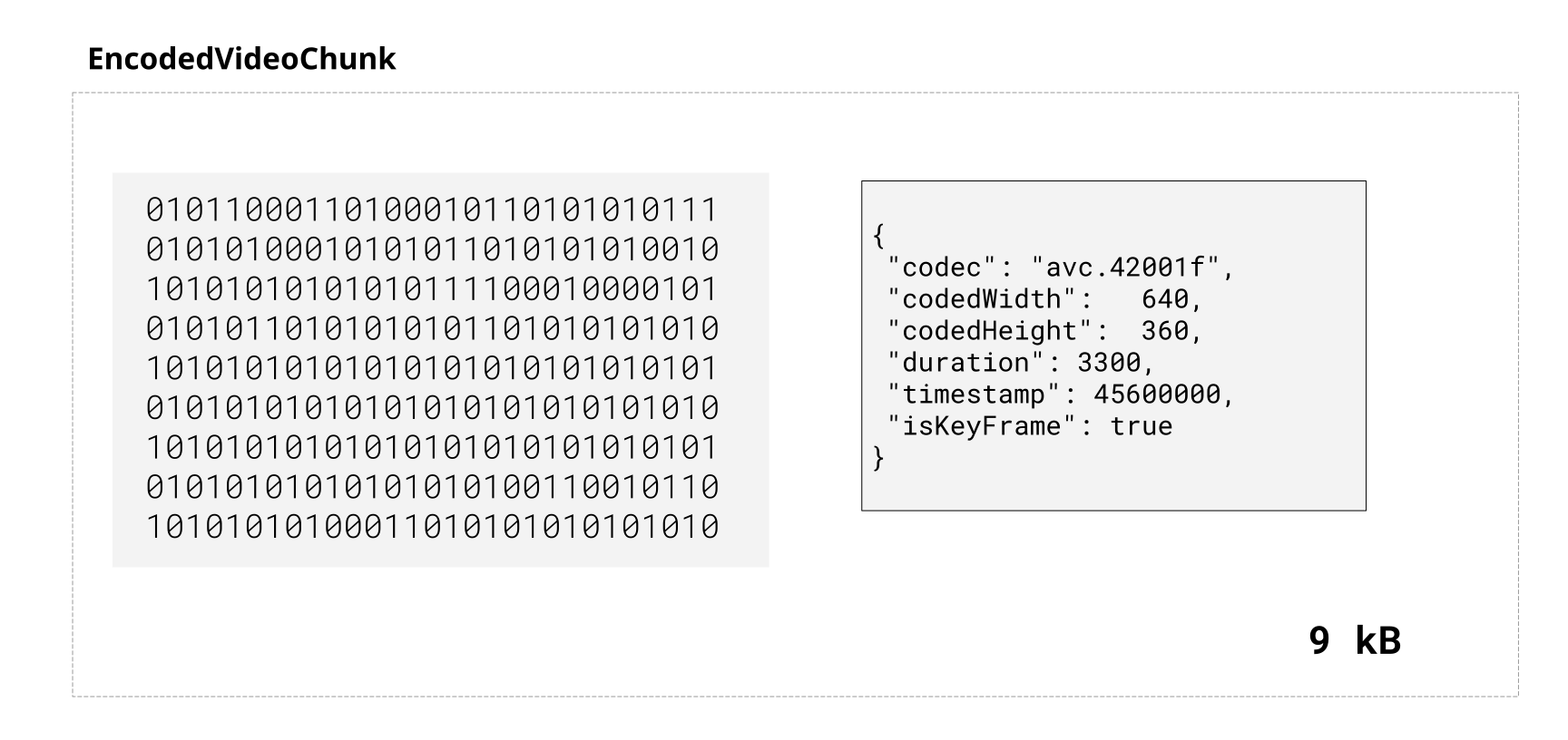
For a streaming, we’d need to send a bunch of these chunks, in real time, in order, over a network, in a bidirectional manner.
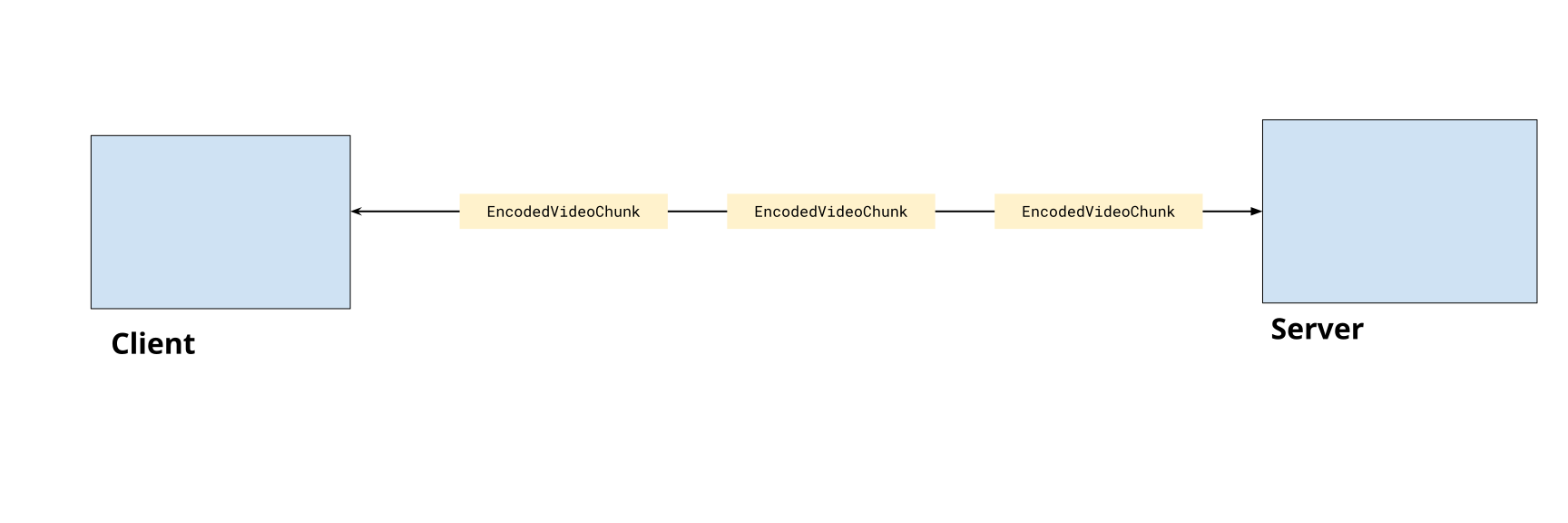
With generic data transfer, there are a number of ways we could accomplish this:
The do-it-yourself networking options
Section titled “The do-it-yourself networking options”You could theoretically expose an HTTP endpoint on your server and POST every frame as data. Here’s a simplified example where metadata is sent as a header
const buffer = new Uint8Array(chunk.byteLength)chunk.copyTo(buffer);
fetch('/upload', { method: 'POST', headers: { 'Content-Type': 'application/octet-stream', 'X-Timestamp': chunk.timestamp.toString(), 'X-Index': chunkIndex.toString(), 'X-Keyframe': chunk.type === 'key' ? '1' : '0', }, body: chunk.data,});app.post('/upload', (req, res) => { const timestamp = parseInt(req.headers['x-timestamp']); const keyframe = req.headers['x-keyframe'] === '1'; const chunkIndex = parseInt(req.headers['x-index']); const data = req.body; res.json({ ok: true });});For streaming this is impractical, as you’d be sending dozens of http requests per second which is slow and error prone. There is also no way to send data back to the client. You could make http work if you just need to upload media in chunks without worrying about real-time, but there are also inherently more suitable options.
Web Sockets
Section titled “Web Sockets”Web Sockets enables you create a persistent connection with a server, and it enables bidirectional flows of data. Here you could come up with your own binary encoding scheme to fit metadata and chunk data together into a single binary buffer and send those between server and client.
const ws = new WebSocket('ws://localhost:3000/upload');
const encoder = new VideoEncoder({  output: (chunk) => {      const binaryData = <Uint8Array> customBinaryEncodingScheme(chunk);      ws.send(binaryData);  },  error: (e)=>{} //error handling});
// Just an example, this is not official or canonical but it would workfunction customBinaryEncodingScheme(chunk: EncodedVideoChunk): Uint8Array {
const metadata = { timestamp: chunk.timestamp, keyframe: chunk.type === 'key', size: chunk.data.byteLength, };
// Format: [metadata JSON length (4 bytes)] [metadata JSON] [binary data] const metadataStr = JSON.stringify(metadata); const metadataBytes = new TextEncoder().encode(metadataStr);
const frame = new ArrayBuffer(4 + metadataBytes.length + chunk.data.byteLength); const view = new DataView(frame);
// Write metadata length as 32-bit integer view.setUint32(0, metadataBytes.length, true);
// Write metadata new Uint8Array(frame, 4, metadataBytes.length).set(metadataBytes);
// Write binary data return new Uint8Array(frame, 4 + metadataBytes.length).set(new Uint8Array(chunk.data)};const express = require('express');const WebSocket = require('ws');const app = express();const server = http.createServer(app);const wss = new WebSocket.Server({ server });
wss.on('connection', (ws) => {
ws.on('message', (data) => { // data is a Buffer const chunk = parseCustomBinary(data); });
});If you are only sending data one way, this could work, but if you need to enable data from one browser to another, you’d need your server to concurrently handle multiple websocket sessions and set up your own routing system.
Web Transport
Section titled “Web Transport”WebTransport is like a successor to WebSockets, with support being rolled out [2], but it enables better performance and uses the Streams API. WebTransport lets you write this as a pipeline, where the video frame source (e.g. a user webcam) gets piped through the encoder (a TransformStream wrapper) and piped to a writer, which then writes data in a stream-like fashion over the network.
const transport = await WebTransport.connect('https://localhost:3000/upload');const stream = await transport.createUnidirectionalStream();const writer = stream.getWriter();
//PseudoCodeframeSource.pipeThrough(videoEncoder).pipeTo(writer);
This is a practical option for unidirectional streams, though like WebSockets, if you need to enable data from one browser to another, you’d need to set up your own routing system.
Media over Quic
Section titled “Media over Quic”Media over Quic is a new protocol specifically designed for this use case of facilitating delivery of WebCodecs and other low-level streaming data without the need for ‘do-it-yourself’ networking.
It works as a pub-sub system, where a publisher can publish a stream of data to a relay, and a subscriber can subscribe to streams of data from a relay.
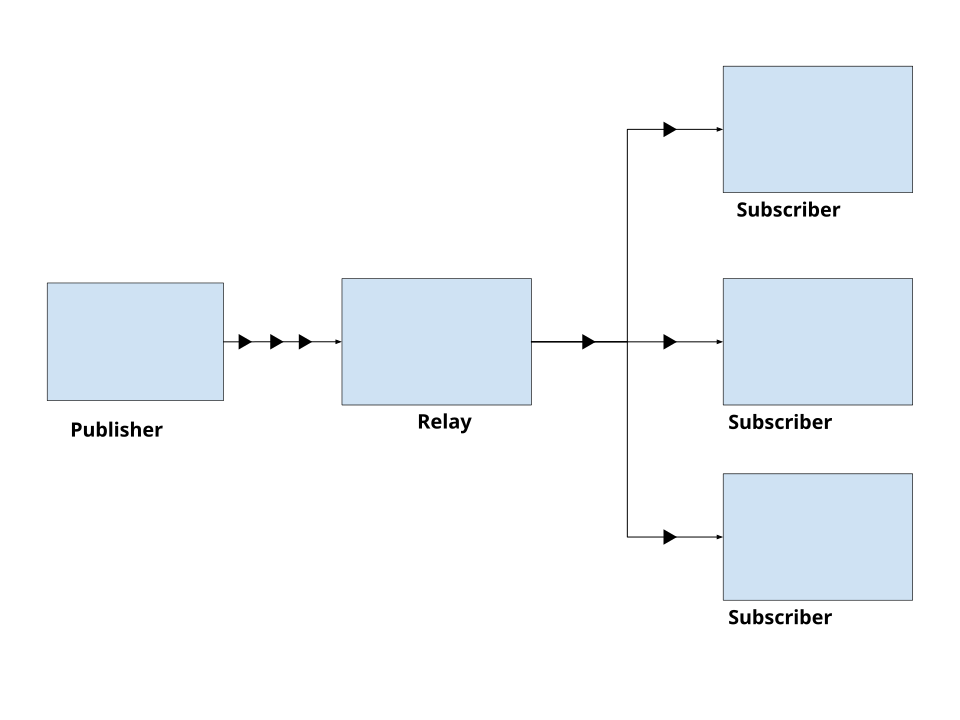
Unlike WebRTC servers (which are also relays) Media over Quic relays are content-agnostic and don’t rely on ‘session state’, making it more scalable. You can self host a relay [2], but several CDN providers also offer Media Over Quick relays [3].
import * as Moq from "@moq/lite";
const connection = await Moq.connect("https://relay.moq.some-cdn.com");
const broadcast = new Moq.Broadcast();
connection.publish('my-broadcast', broadcast);
// Pull-mode, tracks are created when subscribers subscribeconst {track, priority} =  await broadcast.requested();
if(track.name ==='chat'){  const group = track.appendGroup();  group.writeString("Hello, MoQ!");  group.close();}
import * as Moq from "@moq/lite";
const connection = await Moq.connect("https://relay.moq.some-cdn.com");
// Subscribe to a broadcastconst broadcast = connection.consume("my-broadcast");
// Subscribe to a specific trackconst track = await broadcast.subscribe("chat");
// Read data as it arrivesfor (;;) { const group = await track.nextGroup(); if (!group) break;
for (;;) { const frame = await group.readString(); if (!frame) break; console.log("Received:", frame); }}Here’s a quick demo of MoQ using Cloudflare’s public relay, where one iframe will publish text messages in a track, and the other a iframe will subscribe to the same track, and listen for messages from the relay
Media over Quic greatly simplifies the networking aspect (you don’t even need to host your own server) while also being performant (CDN relays scale better than a WebRTC server) and providing low-level control over how and when you send encoded video chunks.
This all makes it ideal for our use case of streaming encoded chunks, so that’s what we’ll use in the rest of our examples. You are of course free to use any data transfer mechanism you see fit, that is one of the benefits of WebCodecs.
You can find out more about Media over Quic here, it’s worth a read in general but for now it’s time to get to code.
Getting webcam data
Section titled “Getting webcam data”We’re going to start with streaming video and audio from the browser. Presumably the most common use case is to stream webcam audio and video and so that’s what we’re going to start with.
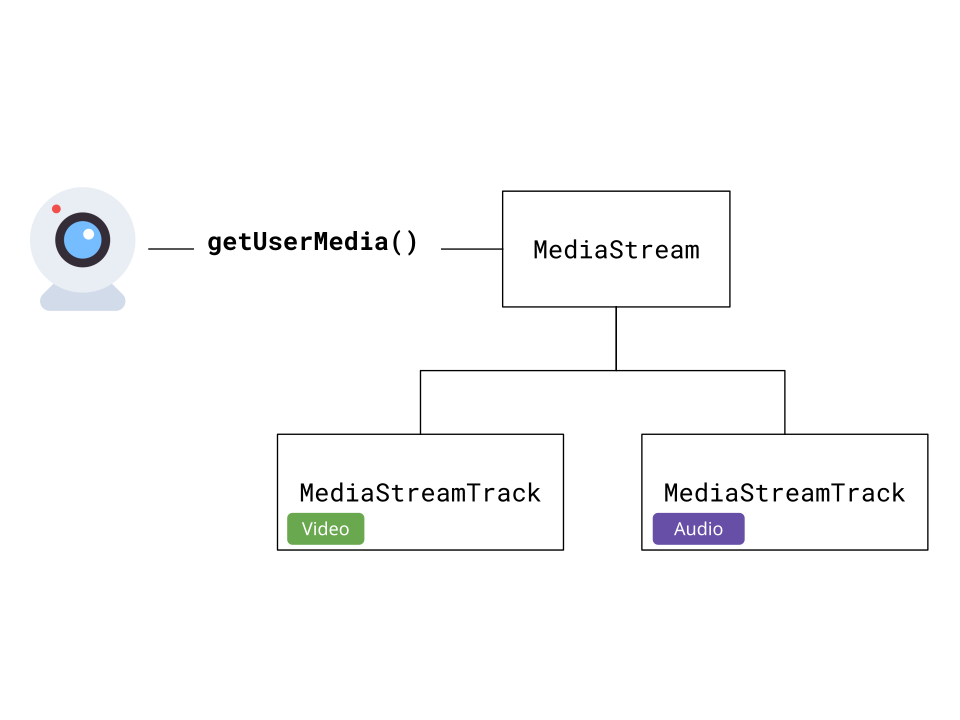
getUserMedia
Section titled “getUserMedia”Our first step is to call getUserMedia which is an async call which will request the user’s webcam, specifically the audio you request
const stream = <MediaStream> await navigator.mediaDevices.getUserMedia({ video: { width: 1280, height: 720 }, audio: true,});This returns a MediaStream object, which allows us to both preview the video, and is necessary for reading raw video frames or audio samples, or with use in other APIs like WebRTC.
We then extract the tracks:
const videoTrack = <MediaStreamTrack> stream.getVideoTracks()[0];const audioTrack = <MediaStreamTrack> stream.getAudioTracks()[0];And this lets get the specific track for audio and video.
MediaStreamTrackProcessor
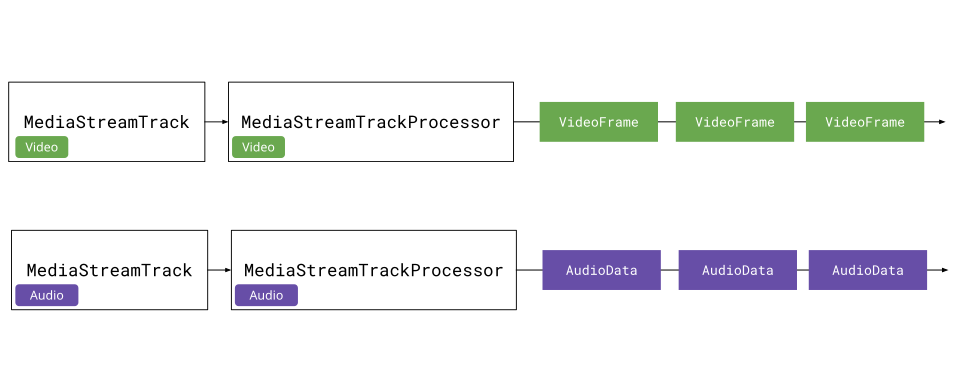
Section titled “MediaStreamTrackProcessor”To actually get raw audio and video data from the stream, we’ll need a MediaStreamTrackProcessor. It’s not yet supported on Safari or Firefox, but we can use a polyfill:
import { MediaStreamTrackProcessor } from 'webcodecs-utils'const videoProcessor = new MediaStreamTrackProcessor({ track: videoTrack });We can then start reading VideoFrame objects:
const reader = videoProcessor.readable.getReader();
while (true) {  const { done, value: frame } = await reader.read();  if (done) break;
  // Process the VideoFrame  console.log('Frame timestamp:', frame.timestamp);
  // Don't forget to close frames when done!  frame.close();}
Each VideoFrame contains the raw video data along with metadata like timestamp. We need to close frames after processing to free memory.
const audioProcessor = new MediaStreamTrackProcessor({ track: audioTrack });const reader = audioProcessor.readable.getReader();
while (true) {  const { done, value: audioData } = await reader.read();  if (done) break;
  // Process the AudioData  console.log('Audio sample rate:', audioData.sampleRate);  console.log('Number of frames:', audioData.numberOfFrames);
  // Don't forget to close audio data when done!  audioData.close();}
The audio processor returns AudioData objects containing raw audio samples along with metadata like sample rate and channel count.
Encoding Pipeline
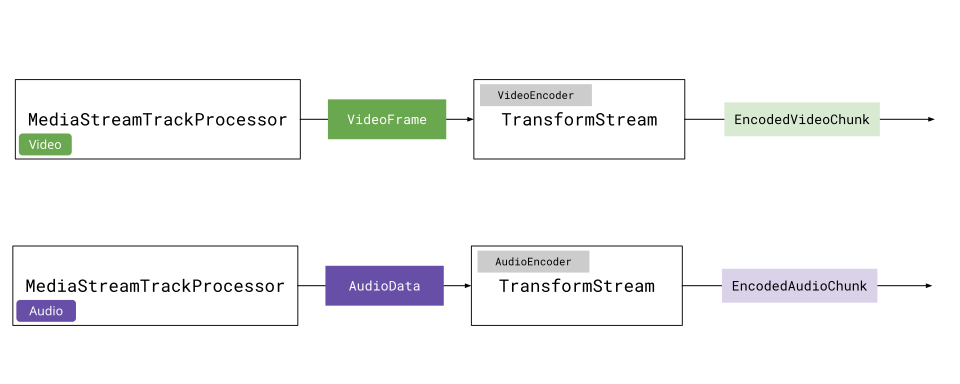
Section titled “Encoding Pipeline”Rather than manually reading frames and encoding them one-by-one, we can use the Streams API to create a pipeline. We can wrap VideoEncoder and AudioEncoder in TransformStream objects.
Here’s what a VideoEncoderStream looks like:
class VideoEncoderStream extends TransformStream<VideoFrame, { chunk: EncodedVideoChunk; meta: EncodedVideoChunkMetadata }> {  constructor(config: VideoEncoderConfig) {    let encoder: VideoEncoder;    let frameIndex = 0;
    super({      start(controller) {        encoder = new VideoEncoder({          output: (chunk, meta) => {            controller.enqueue({ chunk, meta });          },          error: (e) => controller.error(e),        });        encoder.configure(config);      },
      async transform(frame, controller) {        // Apply backpressure        while (encoder.encodeQueueSize >= 20) {          await new Promise((r) => setTimeout(r, 10));        }        encoder.encode(frame, { keyFrame: frameIndex % 60 === 0 });        frame.close();        frameIndex++;      },
      async flush() {        await encoder.flush();        if (encoder.state !== 'closed') encoder.close();      },    }, { highWaterMark: 10 });  }}
The TransformStream takes VideoFrame as input and outputs EncodedVideoChunk. The start method sets up the encoder, transform encodes each frame, and flush cleans up when the stream ends.
import { getBitrate, getCodecString } from 'webcodecs-utils';
const videoSettings = videoTrack.getSettings();const width = videoSettings.width;const height = videoSettings.height;const fps = videoSettings.frameRate || 30;
// Calculate optimal bitrate and codec stringconst bitrate = getBitrate(width, height, fps, 'good');const config: VideoEncoderConfig = {  codec: getCodecString('avc', width, height, bitrate),  width,  height,  bitrate,  framerate: fps,};
const videoEncoderStream = new VideoEncoderStream(config);
// Pipe frames through encoderconst encodedVideoStream = videoProcessor.readable  .pipeThrough(videoEncoderStream);
The pipeline will now output EncodedVideoChunk objects representing the user’s webcam (you can do the same for audio). Using the Streams API helps us manage memory and automatically handles setup, flushing and clean up.
Recording WebCam demo
Section titled “Recording WebCam demo”Now we have a stream of EncodedVideoChunk and EncodedAudioChunk data from our webcam. In the next section, we’ll pipe this to the internet, but just to have an intermediate working demo, we’ll pipe this data to a file.
First, we’ll create a muxer
import { Muxer, StreamTarget } from 'mp4-muxer';
const storage = new InMemoryStorage();const target = new StreamTarget({  onData: (data: Uint8Array, position: number) => {    storage.write(data, position);  },  chunked: true,  chunkSize: 1024 * 1024 * 10});
const muxer = new Muxer({  target,  video: {    codec: 'avc',    width: videoSettings.width!,    height: videoSettings.height!,  },  audio: {    codec: 'aac',    numberOfChannels: audioSettings.channelCount!,    sampleRate: audioSettings.sampleRate!,  },  firstTimestampBehavior: 'offset',  fastStart: 'in-memory',});
Then we’ll create a muxer writer for each track
createVideoMuxerWriter(muxer: Muxer<StreamTarget>): WritableStream<{ chunk: EncodedVideoChunk; meta: EncodedVideoChunkMetadata }> { return new WritableStream({ async write(value) { muxer.addVideoChunk(value.chunk, value.meta); } });}function createAudioMuxerWriter(muxer: Muxer<StreamTarget>): WritableStream<EncodedAudioChunk> { return new WritableStream({ async write(chunk) { muxer.addAudioChunk(chunk); } });}Then we can create a pipeline.
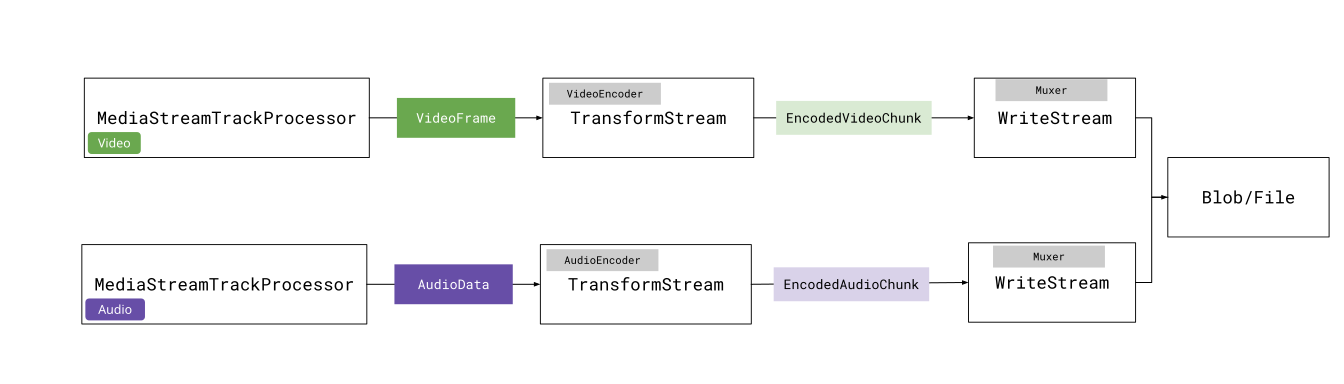
The AbortController allows us to stop the pipelines at any time via abortController.abort(), and so you could create a ‘stop recording’ button and have that call abortController.abort() to stop recording.
const abortController = new AbortController();
const videoPipeline  = videoProcessor.readable.pipeThrough(videoEncoderStream).pipeTo(createVideoMuxerWriter(muxer), { signal: abortController.signal });
const audioPipeline = audioProcessor.readable.pipeThrough(audioEncoderStream).pipeTo(createAudioMuxerWriter(muxer), { signal: abortController.signal })
We can await the pipelines, and the promise will resolve when the pipelines are done. We can then get our recorded video back;
// Resolves when we call abortController.abort()await Promise.all([videoPipeline, audioPipeline]);muxer.finalize();const blob = storage.toBlob('video/mp4');Putting it all together, we can now record video in the browser without MediaRecorder, but rather by extracting VideoFrame and AudioData objects from the MediaStream, piping those through encoders, and streaming the results to a file.
See the full code here
Streaming video over MoQ
Section titled “Streaming video over MoQ”Now that we can covered:
- How to send data over a Media over Quic (MoQ) relay
- How to grab a stream of encoded audio & video from a webcam
The next obvious step is to send encoded video over the network. We’re going to start with sending data between browsers as it’s the simplest case.
The way to send arbitrary binary data over a track using the @moq/lite library is as follows:
// Pull-mode, tracks are created when subscribers subscribeconst {track, priority} =  await broadcast.requested();
if(track.name ==='video'){  const group = track.appendGroup();  group.writeFrame(<Uint8Array> buffer); //whatever you want  group.close();}
Where you create a group, and in that group you can attach an arbitrary number of Uint8Array buffers. And as we saw, EncodedVideoChunk objects are just binary data + metadata.
MoQ doesn’t provide a specific protocol for how to send video or audio data. A core aspect of MoQ is that it is content agnostic, so you can come up with any schema you want for transmitting encoded chunks, as long as it is packaged as a Uint8Array.
This goes well with WebCodecs, in that both technologies gives you much more control over encoding/data-transfer than is possible with WebRTC.
If you just want something that works though, you can use an existing protocol like Hang which both works and is incredibly simple.
Hang Protocol
Section titled “Hang Protocol”Hang is a protocol for transmitting streaming media via MoQ. There is a library to implement this, but the protocol is simple enough to implement yourself.
Catalog.json
Section titled “Catalog.json”Hang works by the publisher publishing a track called 'catalog.json' with the available video and audio tracks to consume with the following structure:
{ "video": { "renditions": { /*video0 is the name of the video track */ "video0": { "codec": "avc1.64001f", "description": "0164001fffe100196764001fac2484014016ec0440000003004000000c23c60c9201000568ee32c8b0", "codedWidth": 1280, "codedHeight": 720 } }, "priority": 1 }, "audio": { "renditions": { /*audio1 is the name of the audio track */ "audio1": { "codec": "mp4a.40.2", "sampleRate": 44100, "numberOfChannels": 2, "bitrate": 283637 } }, "priority": 2 }}Where you specify available ‘audio’ tracks under ‘audio’ and video tracks under ‘video’. Each available track is listed under 'renditions', and you’d specify the track name for each track.
The value for catalog.video.tracks[trackName] is the VideoDecoderConfig you need to decode the video track, and catalog.audio.tracks[trackName] has the config needed for AudioDecoderConfig.
So to actually connect to a session, and be ready to start sending data, we’d have the publisher publish a broadcast, and have each subscriber subscribe to a broadcast, which provides the namespace.
import * as Moq from "@moq/lite";const connection = await Moq.connect("https://relay.moq.some-cdn.com");const broadcast = new Moq.Broadcast();connection.publish('my-broadcast', broadcast);import * as Moq from "@moq/lite";const connection = await Moq.connect("https://relay.moq.some-cdn.com");const broadcast = connection.consume("my-broadcast");Then, the publisher will publish track info via catalog.json. Because MoQ lite is built in a pull manner, the publisher listens for catalog.json track requests.
for (;;) { const trackRequest = await broadcast.requested(); const requestedTrack = trackRequest.track; if (requestedTrack.name === 'catalog.json') { const catalogJson = JSON.stringify(catalogData); const group = requestedTrack.appendGroup(); group.writeString(catalogJson); group.close(); }}Any subscriber can then subscribe to the catalog.json track in the broadcast, and once it receives the catalog, it can start listening for the video and audio tracks, as well as set up the AudioDecoder and VideoDecoder
const catalogTrack = broadcast.subscribe('catalog.json');
for (;;) {  const catalogGroup = await catalogTrack.nextGroup();  if (catalogGroup) {    const catalogJson = await catalogGroup.readString();    const catalog = JSON.parse(catalogJson);    // You know what tracks to listen for  }}
Streaming chunks
Section titled “Streaming chunks”The catalog has most of the data now needed to decode video or audio chunks, but there’s still two key bits of info needed: which chunks are key frames, and the timestamp of each chunk.
First, to encode the timestamp, we’ll actally use a fixed 8-byte header to store the timestamp as an unsigned 8-byte integer.
//EncodedVideoChunk or EncodedAudioChunkconst timestamp = chunk.timestamp;const header = new Uint8Array(8);const view = new DataView(header.buffer, header.byteOffset, 8);view.setBigUint64(0, BigInt(timestamp));Then, to encode the chunk, we’ll create a Uint8Array which is the size of the encoded chunk + the header byteLength, and then we set the header at position 0, and the chunk data at position 8 (header byteLength).
const data = new Uint8Array(header.byteLength + chunk.byteLength);data.set(header, 0);chunk.copyTo(data.subarray(header.byteLength));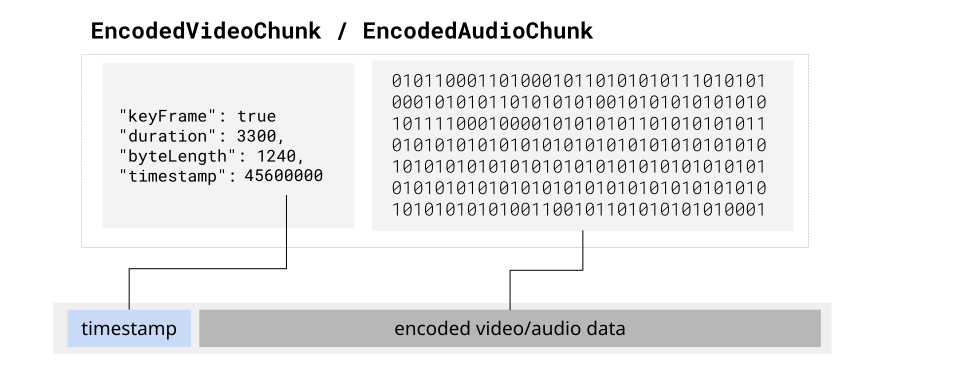
The receiver would parse the header to get the timestamp, and rest of the array would be the actual chunk data.
This just leaves the question of which chunks are keyFrames. The way we can handle this is by writing chunks in groups
let group: Moq.Group | undefined;
const encoder = new VideoEncoder({  output: (frame: EncodedVideoChunk) => {    if (frame.type === "key") {      groupTimestamp = frame.timestamp as Time.Micro;      group?.close();      group = track.appendGroup();    }    const buffer = encodeFrame(frame); // Logic from above    group?.writeFrame(buffer);  },  error: (err: Error) => {    track.close(err);    group?.close(err);  },});
Then, when the subscriber listens for new groups in the track, the first frame in the group is always a key frame
const track = await broadcast.subscribe("videoTrack");
// Read data as it arrivesfor (;;) {  const group = await track.nextGroup();  if (!group) break;  let keyframe = true; // First is always a key frame  for (;;) {    const frame = await group.readFrame();    if(frame){        parseFrame(frame, keyframe);        keyframe = false;    }  }}
While MoQ was built to be content agnostic, one reason for including groups as a core aspect was to enable sending groups of pictures (a key frame and all it’s subsequent delta frames), to improve streaming stability
Browser to Browser Streaming
Section titled “Browser to Browser Streaming”With the Hang protocol, we now have everything to start streaming WebCodecs audio and video over MoQ. We’ll start by defining a publisher, which takes in the Audio/Video Config, listens for audio/video tracks, and creates audio/video pipelines to stream over MoQ.
Publisher
import { MediaStreamTrackProcessor, getSampleRate } from 'webcodecs-utils';import { VideoEncoderStream } from './video-encoder-stream'; // TransformStream discussed aboveimport { AudioEncoderStream } from './audio-encoder-stream'; // TransformStream discussed above
export class MoqPublisher {  private videoTrack: MediaStreamTrack;  private audioTrack: MediaStreamTrack;  private broadcast: any;  private videoConfig: VideoEncoderConfig;  private audioConfig: AudioEncoderConfig;  private videoMoqTrack: any = null;  private audioMoqTrack: any = null;  private abortController: AbortController | null = null;
  constructor(    videoTrack: MediaStreamTrack,    audioTrack: MediaStreamTrack,    broadcast: any,    videoConfig: VideoEncoderConfig,    audioConfig: AudioEncoderConfig  ) {    this.videoTrack = videoTrack;    this.audioTrack = audioTrack;    this.broadcast = broadcast;    this.videoConfig = videoConfig;    this.audioConfig = audioConfig;  }
  async start(): Promise<void> {    if (this.abortController) {      throw new Error('Already publishing');    }
    this.abortController = new AbortController();
    for(;;){ // Listen for track requests      const trackRequest = this.broadcast.requested();      if(trackRequest) this.handleTrackRequest(trackRequest)      await new Promise((r)=>requestAnimationFrame(r));    }

  }
  async handleTrackRequest(trackRequestPromise){
    const trackRequest = await trackRequestPromise;    const requestedTrack = trackRequest.track;
    if (requestedTrack.name === 'video' && !this.videoMoqTrack) {
      this.videoMoqTrack = requestedTrack;
      // Video pipeline      const videoProcessor = new MediaStreamTrackProcessor({ track: this.videoTrack });      const videoEncoderStream = new VideoEncoderStream(this.videoConfig);
      // Start video pipeline      videoProcessor.readable        .pipeThrough(videoEncoderStream)        .pipeTo(this.createVideoWriter(this.videoMoqTrack), {          signal: this.abortController.signal        });    } else if (requestedTrack.name === 'audio' && !this.audioMoqTrack) {      this.audioMoqTrack = requestedTrack;
          // Audio pipeline    const audioProcessor = new MediaStreamTrackProcessor({ track: this.audioTrack });    const audioEncoderStream = new AudioEncoderStream(this.audioConfig);
      // Start audio pipeline      audioProcessor.readable        .pipeThrough(audioEncoderStream)        .pipeTo(this.createAudioWriter(this.audioMoqTrack), {          signal: this.abortController.signal        });    }
  }
  private createVideoWriter(moqTrack: any): WritableStream<{ chunk: EncodedVideoChunk; meta: EncodedVideoChunkMetadata }> {    let currentGroup: any = null;
    return new WritableStream({      async write(value: EncodedVideoChunk) {        // Start new group on keyframe (GOP - group of pictures)        if (value.chunk.type === 'key') {          if (currentGroup) {            currentGroup.close();          }          currentGroup = moqTrack.appendGroup();        }
        if (!currentGroup) {          // First chunk must be a keyframe          currentGroup = moqTrack.appendGroup();        }
        // Hang format: [timestamp (8 bytes)] [data]        const chunkData = new Uint8Array(value.chunk.byteLength);        value.chunk.copyTo(chunkData);
        const buffer = new Uint8Array(8 + chunkData.byteLength);        const view = new DataView(buffer.buffer);
        // Write timestamp as 64-bit integer (microseconds)        view.setBigUint64(0, BigInt(value.chunk.timestamp), true);
        // Write chunk data        buffer.set(chunkData, 8);
        currentGroup.writeFrame(buffer);      },      async close() {        if (currentGroup) {          currentGroup.close();        }      }    });  }
  private createAudioWriter(moqTrack: any): WritableStream<EncodedAudioChunk> {    return new WritableStream({      async write(chunk: EncodedAudioChunk) {        const group = moqTrack.appendGroup();
        // Hang format: [timestamp (8 bytes)] [data]        const chunkData = new Uint8Array(chunk.byteLength);        chunk.copyTo(chunkData);
        const buffer = new Uint8Array(8 + chunkData.byteLength);        const view = new DataView(buffer.buffer);
        // Write timestamp as 64-bit integer (microseconds)        view.setBigUint64(0, BigInt(chunk.timestamp), true);
        // Write chunk data        buffer.set(chunkData, 8);
        group.writeFrame(buffer);        group.close();      }    });  }
  stop(): void {    if (this.abortController) {      this.abortController.abort();      this.abortController = null;    }  }}
Next we define the subscriber, which will listen for catalog.json, and then when it’s available, it will parse the catalog, and setup a VideoDecoder for the video track, an AudioDecoder for the audio track, and then it will start listening for each track, retrieving each group of frames and sending them for decode.
Subscriber
export interface MoqFrame {  timestamp: number;  type?: 'key' | 'delta';  data: Uint8Array;}
export class MoqSubscriber {  private videoTrack: any;  private audioTrack: any;  private videoDecoder: VideoDecoder | null = null;  private audioDecoder: AudioDecoder | null = null;  private catalog: any;
  constructor(catalog: any, videoTrack: any, audioTrack: any) {    this.catalog = catalog;    this.videoTrack = videoTrack;    this.audioTrack = audioTrack;  }
  async startVideo(onFrame: (frame: VideoFrame) => void): Promise<void> {    // Get video config from catalog    const videoRendition = Object.values(this.catalog.video.renditions)[0] as any;
    this.videoDecoder = new VideoDecoder({      output: onFrame,      error: (e) => console.error('Video decoder error:', e),    });
    const config: VideoDecoderConfig = {      codec: videoRendition.codec,      codedWidth: videoRendition.codedWidth,      codedHeight: videoRendition.codedHeight,    };
    this.videoDecoder.configure(config);
    // Start reading video frames    (async () => {      try {        while (true) {          const group = await this.videoTrack.nextGroup();          if (!group) break;
          // First frame in group is always a keyframe          let isKeyframe = true;
          // Read all frames in the group          for (;;) {            const frameData = await group.readFrame();            if (!frameData) break;
            const frame = this.parseVideoFrame(frameData, isKeyframe);
            const chunk = new EncodedVideoChunk({              timestamp: frame.timestamp,              type: frame.type!,              data: frame.data,            });
            this.videoDecoder!.decode(chunk);            isKeyframe = false; // Subsequent frames are delta          }        }      } catch (error) {        console.error('Video read error:', error);      }    })();  }
  async startAudio(onData: (audioData: AudioData) => void): Promise<void> {    // Get audio config from catalog    const audioRendition = Object.values(this.catalog.audio.renditions)[0] as any;
    this.audioDecoder = new AudioDecoder({      output: onData,      error: (e) => console.error('Audio decoder error:', e),    });
    this.audioDecoder.configure({      codec: audioRendition.codec,      sampleRate: audioRendition.sampleRate,      numberOfChannels: audioRendition.numberOfChannels,    });
    // Start reading audio frames    (async () => {      try {        while (true) {
          const group = await this.audioTrack.nextGroup();          if (!group) break;
          const frameData = await group.readFrame();          const frame = this.parseAudioFrame(frameData);
          const chunk = new EncodedAudioChunk({            timestamp: frame.timestamp,            type: 'key',            data: frame.data,          });
          this.audioDecoder!.decode(chunk);        }      } catch (error) {        console.error('Audio read error:', error);      }    })();  }
  private parseVideoFrame(buffer: Uint8Array, isKeyframe: boolean): MoqFrame {    // Hang format: [timestamp (8 bytes)] [data]    const view = new DataView(buffer.buffer, buffer.byteOffset);
    const timestamp = Number(view.getBigUint64(0, true));    const type = isKeyframe ? 'key' : 'delta';    const data = buffer.slice(8);
    return { timestamp, type, data };  }
  private parseAudioFrame(buffer: Uint8Array): MoqFrame {    // Hang format: [timestamp (8 bytes)] [data]    const view = new DataView(buffer.buffer, buffer.byteOffset);
    const timestamp = Number(view.getBigUint64(0, true));    const data = buffer.slice(8);
    return { timestamp, data };  }
  stop(): void {    if (this.videoDecoder && this.videoDecoder.state !== 'closed') {      this.videoDecoder.close();    }    if (this.audioDecoder && this.audioDecoder.state !== 'closed') {      this.audioDecoder.close();    }  }}
We’ll render the video frames to a <canvas> which is simple enough, but we also need to play back the AudioData objects via WebAudio, so we’ll create an Audio Player class.
Audio Player
export class AudioPlayer {  private audioContext: AudioContext;  private gainNode: GainNode;  private sampleRate: number;  private numberOfChannels: number;  private nextPlayTime: number = 0;
  constructor(sampleRate: number, numberOfChannels: number) {    this.sampleRate = sampleRate;    this.numberOfChannels = numberOfChannels;    this.audioContext = new AudioContext({ sampleRate });    this.gainNode = this.audioContext.createGain();    this.gainNode.connect(this.audioContext.destination);  }
  play(audioData: AudioData): void {    // Extract PCM data from AudioData    const numberOfFrames = audioData.numberOfFrames;    const buffer = this.audioContext.createBuffer(      this.numberOfChannels,      numberOfFrames,      this.sampleRate    );
    // Copy data for each channel    for (let channel = 0; channel < this.numberOfChannels; channel++) {      const channelData = new Float32Array(numberOfFrames);      audioData.copyTo(channelData, {        planeIndex: channel,        format: 'f32-planar',      });      buffer.copyToChannel(channelData, channel);    }
    // Create and schedule buffer source    const source = this.audioContext.createBufferSource();    source.buffer = buffer;    source.connect(this.gainNode);
    const currentTime = this.audioContext.currentTime;    const playTime = Math.max(currentTime, this.nextPlayTime);
    source.start(playTime);    this.nextPlayTime = playTime + buffer.duration;  }
  setVolume(volume: number): void {    this.gainNode.gain.value = volume;  }
  close(): void {    this.audioContext.close();  }}
Now finally we can add the interface which will load the publisher and subscriber respectively, use getUserMedia to get the source from the publisher, and start publishing data to the subscriber(s).
Interface
<!DOCTYPE html><html lang="en"><head><meta charset="UTF-8"><meta name="viewport" content="width=device-width, initial-scale=1.0"><title>MoQ Publisher</title></head><body><div class="container">  <h3>📤 Publisher</h3>  <div id="status" class="status">Initializing...</div>
  <div class="controls">    <button id="startWebcamBtn">Start Webcam</button>    <button id="startPublishBtn" disabled>Start Publishing</button>  </div>
  <video id="preview" autoplay muted playsinline style="width: 100%; max-width: 355px; border-radius: 4px; margin: 10px 0;"></video>
  <div class="log" id="log"></div></div>


<script type="module">  import * as Moq from 'https://esm.sh/@moq/lite';  import { MoqPublisher } from '../../../src/moq/moq-publisher.ts';  import { getSampleRate, getBitrate, getCodecString } from 'webcodecs-utils';
  // Get URL parameters  const params = new URLSearchParams(window.location.search);  const relayUrl = params.get('relay') || 'https://relay.quic.video:4443';  const broadcastName = params.get('broadcast') || 'my-broadcast';
  // UI Elements  const startWebcamBtn = document.getElementById('startWebcamBtn');  const startPublishBtn = document.getElementById('startPublishBtn');  const preview = document.getElementById('preview');
  // State  let connection = null;  let broadcast = null;  let videoTrack = null;  let audioTrack = null;  let stream = null;  let publisher = null;

  async function startWebcam() {    try {
      stream = await navigator.mediaDevices.getUserMedia({        video: { width: 1280, height: 720 },        audio: true,      });
      videoTrack = stream.getVideoTracks()[0];      audioTrack = stream.getAudioTracks()[0];
      preview.srcObject = stream;
      startWebcamBtn.disabled = true;      startPublishBtn.disabled = false;    } catch (error) {
      console.log('Webcam error: ' + error.message, 'error');    }  }
  async function startPublishing() {    try {
      connection = await Moq.Connection.connect(new URL(relayUrl));      broadcast = new Moq.Broadcast();      connection.publish(broadcastName, broadcast);

      startPublishBtn.disabled = true;
      // Create encoder configs      const videoSettings = videoTrack.getSettings();      const audioSettings = audioTrack.getSettings();      const sampleRate = await getSampleRate(audioTrack);
      const codec = 'avc';      const bitrate = getBitrate(videoSettings.width, videoSettings.height, 30, 'good');      const codecString = getCodecString(codec, videoSettings.width, videoSettings.height, bitrate);
      const videoConfig = {        codec: codecString,        width: videoSettings.width,        height: videoSettings.height,        bitrate: Math.round(bitrate),        framerate: 30,      };
      const audioConfig = {        codec: 'opus',        sampleRate: sampleRate,        numberOfChannels: Math.min(audioSettings.channelCount || 2, 2),        bitrate: 128000,      };
      // Get description using the same config      const description = await MoqPublisher.getDescription(videoTrack, videoConfig);
      const catalogData = {        video: {          renditions: {            video0: {              codec: codecString,              codedWidth: videoSettings.width,              codedHeight: videoSettings.height,              description            }          },          priority: 1        },        audio: {          renditions: {            audio0: audioConfig          },          priority: 2        }      };
      // Handle catalog requests      (async () => {        while (true) {          const trackRequest = await broadcast.requested();          const requestedTrack = trackRequest.track;
          if (requestedTrack.name === 'catalog.json') {            const catalogJson = JSON.stringify(catalogData);            const group = requestedTrack.appendGroup();            group.writeString(catalogJson);            group.close();          }        }      })();
      // Start MoQ publisher with configs      publisher = new MoqPublisher(videoTrack, audioTrack, broadcast, videoConfig, audioConfig);      await publisher.start();      log('Publisher started', 'success');
} catch (error) { console.log('Error: ' + error.message, 'error'); } } // Event listeners startWebcamBtn.addEventListener('click', startWebcam); startPublishBtn.addEventListener('click', startPublishing);</script></body></html><!DOCTYPE html><html lang="en"><head> <meta charset="UTF-8"> <meta name="viewport" content="width=device-width, initial-scale=1.0"> <title>MoQ Subscriber</title></head><body> <div class="container"> <h3>📥 Subscriber</h3> <div id="status" class="status">Initializing...</div>
<canvas id="canvas" width="640" height="360" style="width: 100%; max-width: 355px; border-radius: 4px; margin: 10px 0; background: #000;"></canvas>
<div class="log" id="log"></div> </div>
<script type="module"> import * as Moq from 'https://esm.sh/@moq/lite'; import { MoqSubscriber, AudioPlayer } from '../../../src/moq/index.ts';
// Get URL parameters const params = new URLSearchParams(window.location.search); const relayUrl = params.get('relay') || 'https://relay.quic.video:4443'; const broadcastName = params.get('broadcast') || 'my-broadcast';
// UI Elements const statusEl = document.getElementById('status'); const logEl = document.getElementById('log'); const canvas = document.getElementById('canvas'); const ctx = canvas.getContext('2d');
// State let connection = null; let subscriber = null; let frameCount = 0;
async function getCatalog(broadcast) { try { const catalogTrack = broadcast.subscribe('catalog.json');
for (;;) { const catalogGroup = await catalogTrack.nextGroup();
if (catalogGroup) { const catalogJson = await catalogGroup.readString(); const catalog = JSON.parse(catalogJson); log('Received catalog', 'success'); console.log('Catalog:', catalog); return catalog; } } } catch (e) { await new Promise((r) => setTimeout(r, 500)); return await getCatalog(broadcast); } }
async function init() { try {
connection = await Moq.Connection.connect(new URL(relayUrl));
const broadcast = connection.consume(broadcastName);
const catalog = await getCatalog(broadcast);
const videoTrack = await broadcast.subscribe('video');
const audioTrack = await broadcast.subscribe('audio');
// Create audio player const audioRendition = Object.values(catalog.audio.renditions)[0]; const audioPlayer = new AudioPlayer(audioRendition.sampleRate, audioRendition.numberOfChannels);
subscriber = new MoqSubscriber(catalog, videoTrack, audioTrack);
// Start video decoding and rendering subscriber.startVideo((frame) => { ctx.drawImage(frame, 0, 0, canvas.width, canvas.height); frame.close(); frameCount++; });
// Start audio decoding and playback subscriber.startAudio((audioData) => { audioPlayer.play(audioData); audioData.close(); });
updateStatus('Receiving stream', 'success'); log('Decoders started', 'success');
} catch (error) { updateStatus('Connection failed', 'error'); log('Init error: ' + error.message, 'error'); } }
// Initialize init(); </script></body></html>We can now finally put everything together in a live demo, where it will stream your webcam through Media over Quic (via a public cloudflare relay) from the publisher tab to the subscriber tab.
And that’s it! That’s the basics of streaming audio and video over Media over Quic. You can find the source code for the demo here: (HTML, JS).
A lot of this was manually implemented, but you can also use the hang library directly for a more out-of-box experience.
Streaming to and from a server
Section titled “Streaming to and from a server”The idea behind MoQ is that a server can act as a publisher or a subscriber just like any browser client. When streaming data from a browser to a server, the browser would act as a publisher, and the server would act as a subscriber. When streaming from a server to a browser, the server would be the publisher and the browsers would be subscribers.
Server to Browser
Section titled “Server to Browser”A primary use case for streaming from a browser to a server would be for “recording” features, such as recording a meeting / webinar, or recording high-definition versions of user’s web-cameras, which are common features of meeting, webinar and live-streaming softwares.
To accomplish this, we’ll have a server connect to a MoQ relay, and subscribe to the same stream that subscribers listen to.
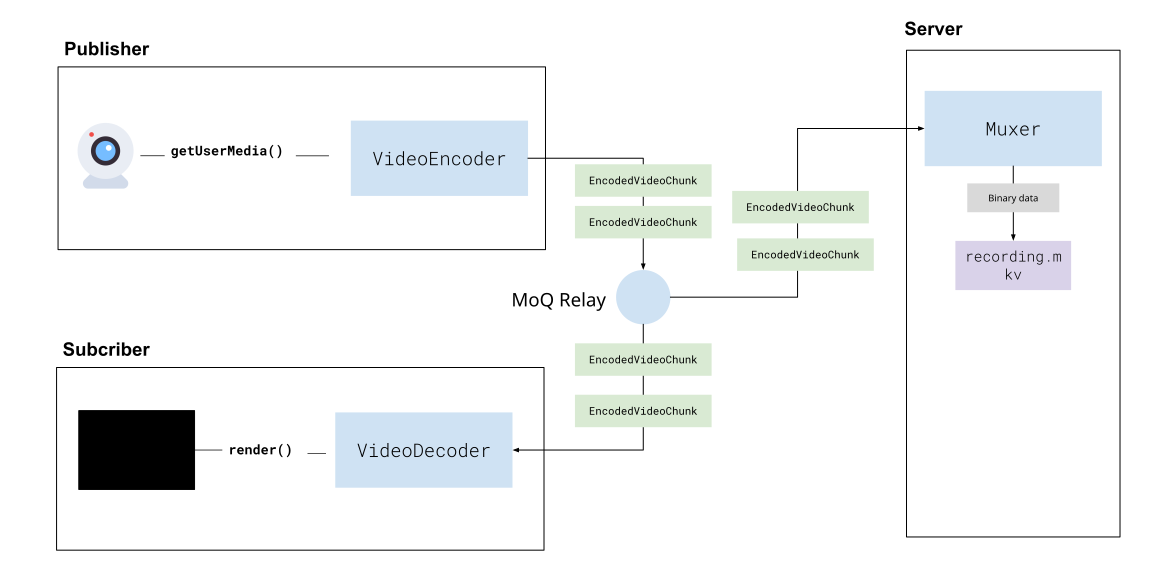
Many existing platforms use a similar approach with WebRTC where the sever joins a session as a participant and just ‘records’, however this usually involves decoding the video from the WebRTC stream and re-encoding it, which is compute intensive and limits scalability.
One advantage of Webcodecs is that we can avoid a decode/encode process and directly mux video to hard disk which is much more efficient. Because WebCodecs provides raw encoded video/audio data, it can work with server-side media processing libraries like PyAV and NodeAV, which are server-runtime bindings for ffmpeg, allowing you to mux encoded video data on the server (to record a user’s stream).
Because Mediabunny works on the server, we’ll use that as our example, but you can use whatever media processing library is available for your target language:
Using Mediabunny to mux files in a javascript/typescript run time, here’s how you’d set up the muxer to write the encoded stream to disk:
import { Output, EncodedPacket, EncodedVideoPacketSource,EncodedAudioPacketSource, FilePathTarget,  Mp4OutputFormat, WebMOutputFormat } from 'mediabunny';
const output = new Output({  format: new Mp4OutputFormat(),  target: new FilePathTarget(outputPath), //Wherever you save this});
// Create video sourceconst videoSource = new EncodedVideoPacketSource('avc');output.addVideoTrack(videoSource);
// Create audio sourceconst audioSource = new EncodedAudioPacketSource('aac' );output.addAudioTrack(audioSource);
As you get data from the client, you’d mux frames as so:
function handleFrame(frame, meta) {    if (frame.type === 'video') {      const packetType = frame.keyframe ? 'key' : 'delta';      const packet = new EncodedPacket(frame.data, packetType, frame.timestamp/1e6, frame.duration/1e6);      videoSource.add(packet, meta);
    } else if (frame.type === 'audio){      const packet = new EncodedPacket(frame.data, 'key', frame.timestamp/1e6, frame.duration/1e6);      audioSource.add(packet, meta);    }}
Where frame and meta are essentially what come out from the AudioEncoder and VideoEncoder, but because we are transmitting data via binary, and EncodedVideoChunk and EncodedAudioChunk don’t exist in server run timestamp we need to encode it to binary on the client, and decode it from binary on the server and just preserve the data structure of EncodedVideoChunk.
new VideoEncoder({output: (chunk: EncodedVideoChunk, meta: any){ const buffer <Uint8Array> encodeBuffer(chunk, meta); //Send this over the network},// ...})const {encodedChunk, meta} = decodeBuffer(<Uint8Array> buffer);Here’s a full Serialization/Deserialization example
Full Serialization / Deserialization
function encodeFrame(type: 'audio' | 'video', chunk: EncodedVideoChunk | EncodedAudioChunk, isKeyframe = false, meta = null): Uint8Array {  const chunkData = new Uint8Array(chunk.byteLength);  chunk.copyTo(chunkData);
  let configBytes = new Uint8Array(0);  let descriptionBytes = new Uint8Array(0);
  if (meta && meta.decoderConfig) {    // Extract description separately    const { description, ...configWithoutDesc } = meta.decoderConfig;
    // Serialize config without description    const configJson = JSON.stringify({ decoderConfig: configWithoutDesc });    configBytes = new TextEncoder().encode(configJson);
    // Keep description as binary    if (description) {      descriptionBytes = new Uint8Array(description);    }  }
  const buffer = new Uint8Array(26 + configBytes.byteLength + descriptionBytes.byteLength + chunkData.byteLength);  const view = new DataView(buffer.buffer);
  let offset = 0;  view.setUint8(offset, type); offset += 1; // 0 = video, 1 = audio  view.setBigUint64(offset, BigInt(chunk.timestamp), true); offset += 8;  view.setBigUint64(offset, BigInt(chunk.duration || 0), true); offset += 8;  view.setUint8(offset, isKeyframe ? 1 : 0); offset += 1;  view.setUint32(offset, configBytes.byteLength, true); offset += 4;
  buffer.set(configBytes, offset); offset += configBytes.byteLength;
  view.setUint32(offset, descriptionBytes.byteLength, true); offset += 4;  buffer.set(descriptionBytes, offset); offset += descriptionBytes.byteLength;  buffer.set(chunkData, offset);
return buffer;}/*** Parse binary frame format:* [type (1 byte)][timestamp (8 bytes)][duration (8 bytes)][keyframe (1 byte)]* [configLength (4 bytes)][config JSON][descLength (4 bytes)][description][data]* type: 0 = video, 1 = audio, 2 = config*/
function parseFrame(buffer: Uint8Array) {
const view = new DataView(buffer.buffer, buffer.byteOffset);
const type = view.getUint8(0);
if (type === 2) { // Config message: [type][config JSON] const configJson = buffer.slice(1).toString(); return { type: 'config', config: JSON.parse(configJson) };}
let offset = 0;offset += 1; // typeconst timestamp = Number(view.getBigUint64(offset, true)); offset += 8;const duration = Number(view.getBigUint64(offset, true)); offset += 8;const keyframe = view.getUint8(offset) === 1; offset += 1;const configLength = view.getUint32(offset, true); offset += 4;
let decoderConfig = null;
if (configLength > 0) { // Parse config JSON const configBytes = buffer.slice(offset, offset + configLength); const configJson = new TextDecoder().decode(configBytes); const meta = JSON.parse(configJson); decoderConfig = meta.decoderConfig || null; offset += configLength;}
// Parse description (always present in protocol, even if 0 length)const descLength = view.getUint32(offset, true); offset += 4;if (descLength > 0 && decoderConfig) { const description = buffer.slice(offset, offset + descLength); decoderConfig.description = description; offset += descLength;}
const data = buffer.slice(offset);
return { type: type === 0 ? 'video' : 'audio', timestamp, duration, keyframe, decoderConfig, data};}Then, when you start listening on the server for the stream of data, you’d essentially do something like this:
function onDataFromNetwork(buffer: Uint8Array){ const frame = parseFrame(buffer); //parse the frame handleFrame(frame); //Mux it to disk}When you’re done recording, just call output.finalize()
await output.finalize(); // File saved to diskThe file will be saved to disk. Muxing is efficient enough that you could record dozens of streams in parallel on a single server.
The @moq/lite client we used earlier in the browser also works on the server, although as of January 2026, WebTransport is not available in any server js environment like Node, Bun or Deno, so the server will fall back to connecting to the relay via WebSockets.
Additionally, to use @moq/lite in Node, you’ll need to use a polyfill to enable WebSocket support
import WebSocket from 'ws';import * as Moq from '@moq/lite';// Polyfill WebSocket for MoQglobalThis.WebSocket = WebSocket;For the first time, this demo can’t be embedded in the document as it’s a server repo. You’ll need a javascript runtime (e.g. node, bun, deno) to run the server:
git clone https://github.com/sb2702/webcodecs-examples.gitcd webcodecs-examples/src/moq-servernpm installnode subscriberAnd just open up to http://localhost:3000/upload.html
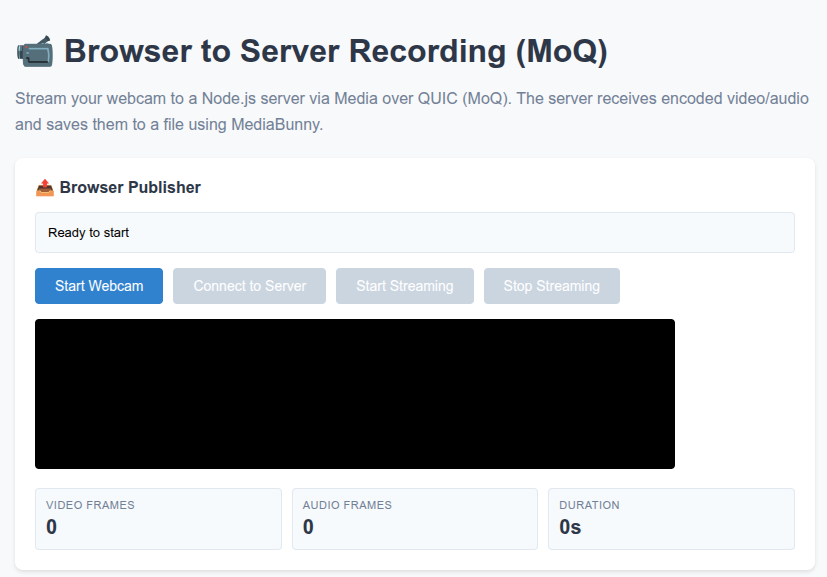
You’ll be able to stream encoded video data to the local server over webcodecs, and mux the stream to a local video file. You can of course see the full source code here: (server, browser)
Server to browser
Section titled “Server to browser”HLS & Dash
Section titled “HLS & Dash”The primary use case for streaming video from a server to a browser would be your typical “live streaming” use case where a server broadcasts some live stream of video from a source (like a sports match), which is typically done by encoding and packaging a source stream into a streaming format like HLS or Dash, which get sent to a CDN [3].
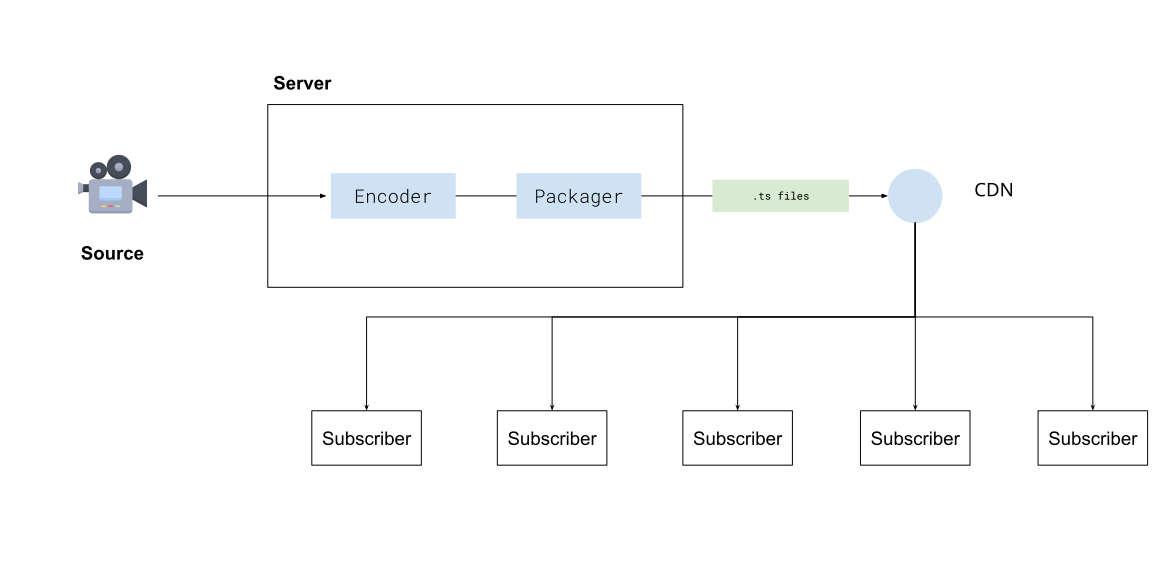
You then have video player software like hls.js or shaka player on each viewer’s device which progressively fetch chunks of the video from a CDN using normal HTTP requests.
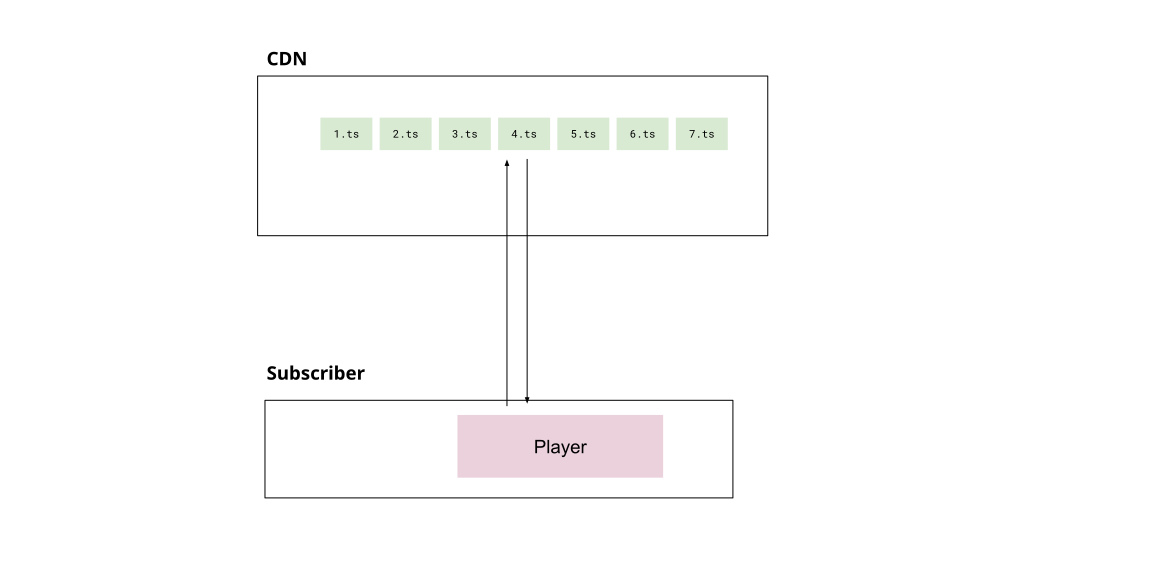
Media over Quic
Section titled “Media over Quic”Previously in the browser to browser streaming case, we saw that a Media over Quic relay (also a CDN) could enable an individual browser to stream to many subscribers at the scale of traditional streaming, but without the server processing and latency overhead of traditional streaming.
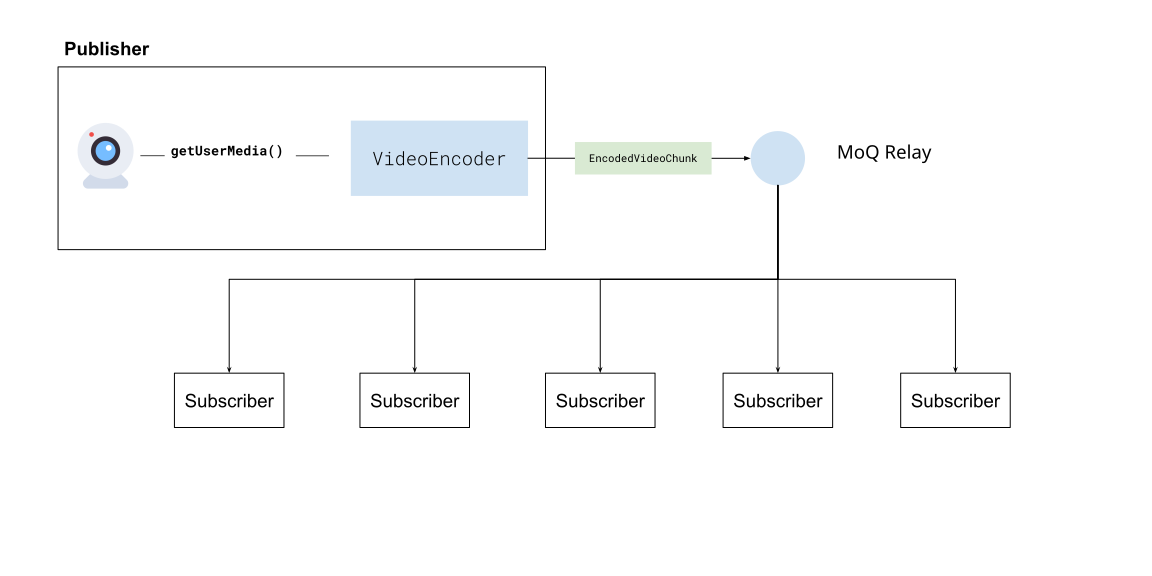
It’s also possible to stream video to a Media over Quic relay from a server to subscribers, accomplishing roughly the same behaviour and scale as HLS/DASH streaming.
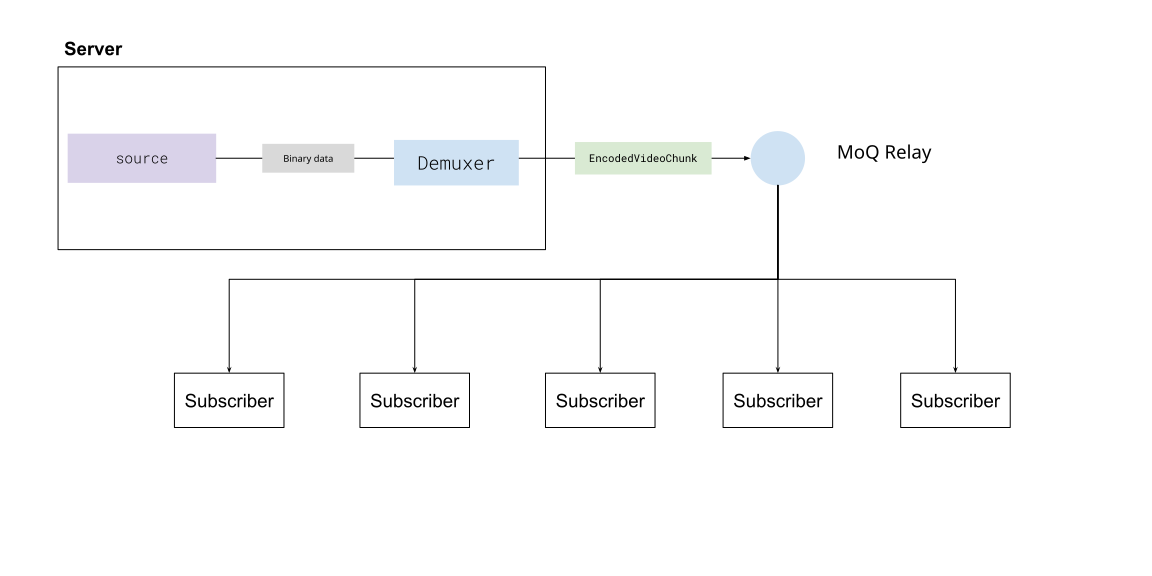
One key difference though is the Quic part of Media over Quic, whereby in this case, viewers are not fetching video segments from a CDN, but instead maintaining an active, open connection to the relay using the Quic protocol.
This means that video never has to go through an intermediate step of being muxed and saved to ts files, and then fetched by player software. With Media over Quic, encoded video and audio can directly be sent in a continious stream to subscribers and decoded with WebCodecs, with the real-time latency of a video call, but at the scale of a CDN with millions of subscribers.
Compared to traditional HLS/DASH streaming, this reduces latency by quite a bit, which is why many companies are excited about it [3][4]
WebCodecs needs Media Over Quic for streaming
Section titled “WebCodecs needs Media Over Quic for streaming”Without the Media over Quic layer, using WebCodecs to stream video from a server to many devices (say via WebSockets) is impractical. You’d be better off using established technologies like WebRTC for real-time, low-volume streaming, or HLS/DASH streaming for high-volume streaming with some latency.
So, for livestreaming with WebCodecs from the server to many clients, Media over Quic is the necessary enabling network layer, and WebCodecs + Media over Quic as a stack has concrete advantages compared to WebRTC and HLS/DASH streaming (low latency and high volume).
Do you need a server?
Section titled “Do you need a server?”Most of the time in streaming, the source of your video isn’t actually your server, typical broadcast workflows include sending video from source cameras via an older protocol like RTMP[5] to a media server, which then processes the stream into an HLS or DASH format for consumption.
There’s no reason you couldn’t have a server that ingests RTMP and outputs to Media over Quic, but RTMP itself adds latency, reducing the primary benefit of Media over Quic. For traditional broadcast workflows (like sports streaming), which also involves specialized hardware, you’d need to replace RTMP and also handle multi-track encoding at the source for Media over Quic to be viable, so there are many incentives to stick with established workflows for traditional broadcasters.
On the other hand, ff you’re an application developer who wants to stream video but also controls the video source, you may not even need a server. In the case of video conferencing, webinars or browser-based live-streaming tools, where the publisher is a user, you don’t even need a server, as client devices are the publisher:
In cases where your application owns the end broadcaster -> viewer stack, Media over Quic + WebCodecs makes much more sense as there are concrete performance and costs benefits compared to older workflows, and in that scenario you might not even need a server to stream video.
Coming soon - server streaming via media over quic
Productionization
Section titled “Productionization”Authentication
Section titled “Authentication”All the examples thus far have used public, un-authenticated relays. MoQ does have authentication built in, you’ll need to manage your own relay server and set up authentication for it.
MoQ relays use signed JWT tokens for stateless authentication. You first generate a key, then configure your server to use the key, and finally you create keys to authenticate users.
Setting up your own sever
Section titled “Setting up your own sever”Step 1 Clone the moq relay repo
git clone https://github.com/moq-dev/moq.gitcd moqStep 2 Install Nix
Step 3 Enable Nix flakes
Step 4 Run the server
nix develop -c just devSee the setup docs for more details
Generate a key
Section titled “Generate a key”You can use either a CLI or a Rust/JS library to generate a key. Here’s how you’d install the CLI (Rust is a prerequisite)
Step 1 Install the CLI
cargo install moq-token-cliStep 2 Generate a key
moq-token --key "root.jwk" generateStep 3: Configure the server to use the key
You need to edit or create config.toml in the root of the server repo, and include the following
[auth]key = "root.jwk" # Path to the key we generated.By specifying the auth and root, the server will by default require auth for all connections
Step 4: Use the key to sign tokens
moq-token --key "root.jwk" sign \ --root "rooms/meeting-123" \ --subscribe "" \ --publish "alice" \ --expires 1703980800 > "alice.jwt"This creates a token that allows a user to connect to the relay url <cdn-url>/<root> and publish to any track with the prefix alice/**
See more docs here
//TODO