
A primer on the Streams API
When working with WebCodecs, especially for tasks like, well, streaming, but also for tasks like transcoding, you’ll often need to process data in stages—reading from files, decoding chunks, encoding frames, and sending it to a network or writing it to a file. The browser’s Streams API is perfectly designed for this kind of pipelined data processing.
Why Streams?
Section titled “Why Streams?”Video processing can’t be done as a simple for loop:
// This is NOT how video processing worksfor (let i=0; i < numChunks; i++){ const chunk = await demuxer.getChunk(i); const frame = await decoder.decodeFrame(chunk); const processed = await render(frame); const encoded = await encoder.encode(processed); muxer.mux(encoded);}That’s because the VideoDecoder and VideoEncoder often need to work with batches of data, so you need to send 3 chunks to the VideoDecoder before it will start decoding frames. Chunks can also get stuck in the encoder / decoder and need to be ‘flushed’ before finishing.
Instead, you need to think of it as a pipeline where multiple stages process data simultaneously, with each stage holding multiple chunks or frames at once.
Consider transcoding a video file, where you typically have 5 stages:
- File Reader - Stream
EncodedVideoChunkobjects from disk - Decoder - Transform chunks into
VideoFrameobjects - Render/Process - Optionally transform frames (filters, effects, etc.)
- Encoder - Transform frames back into
EncodedVideoChunkobjects - Muxer - Write chunks to output file
The Streams API lets you chain these stages together while managing important constraints:
- Limit the number of active
VideoFrameobjects in memory - Limit the encoder’s encode queue
- Limit the decoder’s decode queue
- Avoid reading entire files into memory at once
Types of Streams
Section titled “Types of Streams”The Streams API provides three main types of streams:
ReadableStream
Section titled “ReadableStream”A ReadableStream reads data from a source in chunks and passes it to a consumer.
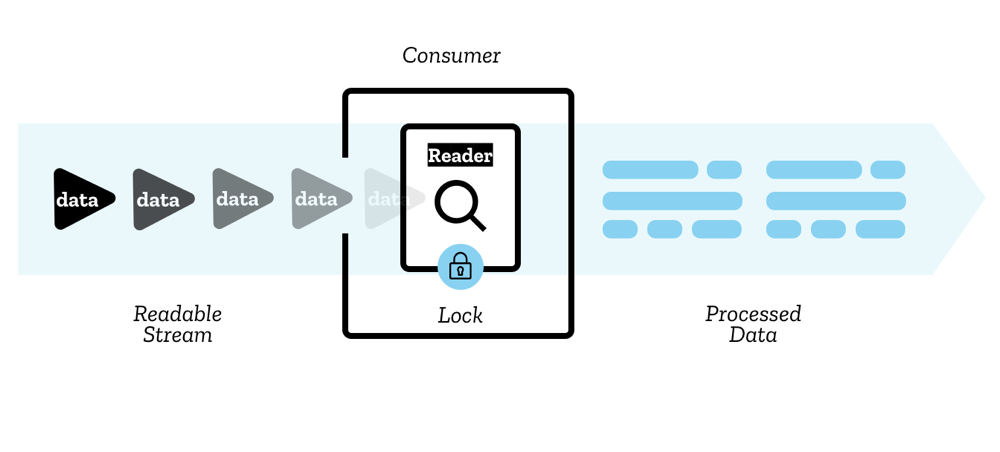
For example, web-demuxer returns a ReadableStream for encoded chunks:
import { WebDemuxer } from 'https://cdn.jsdelivr.net/npm/web-demuxer/+esm';
const demuxer = new WebDemuxer({    wasmFilePath: "https://cdn.jsdelivr.net/npm/web-demuxer@latest/dist/wasm-files/web-demuxer.wasm",});
await demuxer.load(file);
const reader = demuxer.read('video').getReader();
reader.read().then(function processPacket({ done, value }) {    if (value) {        // value is an EncodedVideoChunk        console.log('Got chunk:', value);    }    if (!done) {        return reader.read().then(processPacket);    }});
WritableStream
Section titled “WritableStream”A WritableStream writes data to a destination in chunks.
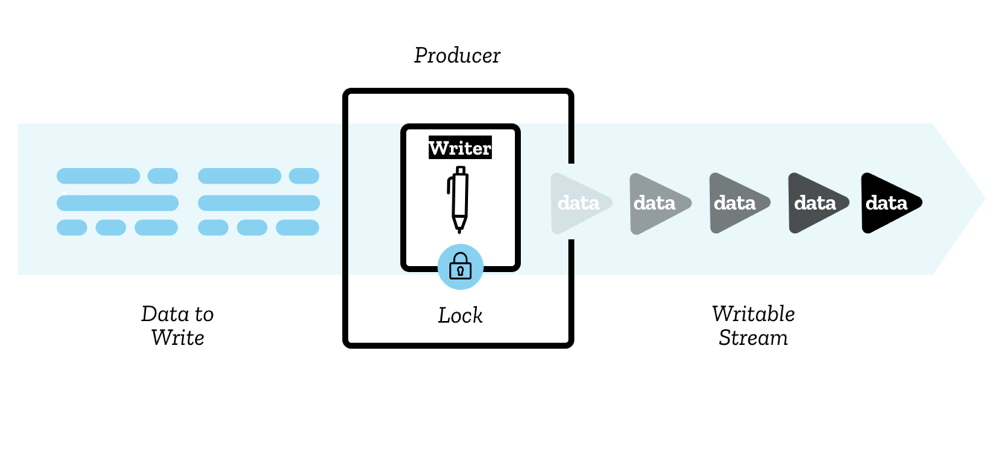
For muxing files, Mediabunny and mp4-muxer both expose a StreamTarget for writing muxed data:
import { StreamTarget } from 'mp4-muxer';
// Writes to file on hard diskconst writable = await fileHandle.createWritable();
const target = new StreamTarget({    onData: (data: Uint8Array, position: number) => {        writable.write({ type: "write", data, position });    },    chunked: true,    chunkSize: 1024 * 1024 * 10  // 10MB chunks});
TransformStream
Section titled “TransformStream”A TransformStream transforms chunks of data from one type to another. This is the most useful type for WebCodecs pipelines.
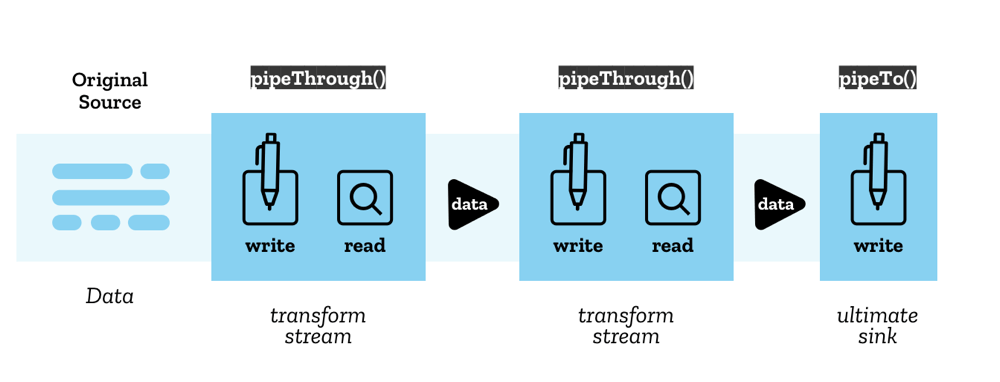
Here’s an example of a VideoEncoder wrapped in a TransformStream:
class VideoEncoderStream extends TransformStream<  VideoFrame,  { chunk: EncodedVideoChunk; meta: EncodedVideoChunkMetadata }> {  constructor(config: VideoEncoderConfig) {    let encoder: VideoEncoder;
    super(      {        start(controller) {          // Initialize encoder when stream starts          encoder = new VideoEncoder({            output: (chunk, meta) => {              controller.enqueue({ chunk, meta });            },            error: (e) => {              controller.error(e);            },          });          encoder.configure(config);        },
        async transform(frame, controller) {          // Encode each frame          encoder.encode(frame, { keyFrame: frame.timestamp % 2000000 === 0 });          frame.close();        },
        async flush(controller) {          // Flush encoder when stream ends          await encoder.flush();          if (encoder.state !== 'closed') encoder.close();        },      },      { highWaterMark: 10 }  // Buffer up to 10 items    );  }}
The TransformStream API provides three key methods:
start(controller)- Called once when the stream is created (setup)transform(chunk, controller)- Called for each chunk of dataflush(controller)- Called when the stream has no more inputs
Chaining Streams
Section titled “Chaining Streams”The real power of the Streams API comes from chaining multiple stages together:
Example 1: Transcoding Pipeline
For transcoding a video file, you chain together file reading, decoding, processing, encoding, and writing:
const transcodePipeline = chunkReadStream  .pipeThrough(new DemuxerTrackingStream())  .pipeThrough(new VideoDecoderStream(videoDecoderConfig))  .pipeThrough(new VideoRenderStream())  .pipeThrough(new VideoEncoderStream(videoEncoderConfig))  .pipeTo(createMuxerWriter(muxer));
await transcodePipeline;
Covered in detail in the transcoding section
Example 2: Streaming to Network
For live streaming from a webcam to a server, you would pipe raw frames through an encoder to a network writer:
// Returns VideoFrames, we'll cover this laterconst webCamFeed = await getWebCamFeed();
// Create network writers (e.g., sends to server over network)const videoNetworkWriter = createVideoWriter();
// Create pipelines with abort signalconst abortController = new AbortController();
// Pipe video: webcam → encoder → networkconst videoPipeline = webCamFeed  .pipeThrough(videoEncoderStream)  .pipeTo(videoNetworkWriter, { signal: abortController.signal });
// Stop streaming when done// abortController.abort();
Covered in detail in the streaming section
This is both more intuitive and also better practice / more performant, because it enables automatic memory management and internal buffering.
When you chain streams this way:
- Data flows automatically from one stage to the next
- Backpressure propagates upstream automatically
- Each stage processes items concurrently
- Memory usage stays bounded by the
highWaterMarkvalues - You can easily stop the entire pipeline with an
AbortController
Backpressure
Section titled “Backpressure”One of the most important concepts in the Streams API is backpressure—the ability for downstream stages to signal upstream stages to slow down when they can’t keep up.
This is managed through two mechanisms:
highWaterMark
Section titled “highWaterMark”Each stream stage specifies a highWaterMark property, which signals the maximum number of items to queue:
new TransformStream( { /* transform logic */ }, { highWaterMark: 10 } // Buffer up to 10 items);controller.desiredSize
Section titled “controller.desiredSize”The controller object has a desiredSize property:
desiredSize = highWaterMark - (current queue size)- If
desiredSize > 0→ upstream should send more data - If
desiredSize < 0→ upstream should slow down
You can use this to implement backpressure in your transform logic:
async transform(item, controller) {  // Wait if downstream is backed up  while (controller.desiredSize !== null && controller.desiredSize < 0) {    await new Promise((r) => setTimeout(r, 10));  }
  // Also check the encoder's internal queue  while (encoder.encodeQueueSize >= 20) {    await new Promise((r) => setTimeout(r, 10));  }
  encoder.encode(item.frame);}
This ensures that:
- You don’t overwhelm the encoder with too many frames
- You don’t fill up memory with decoded frames waiting to be encoded
- The file reader slows down when downstream stages are busy
Common Stream Patterns for WebCodecs
Section titled “Common Stream Patterns for WebCodecs”When working with WebCodecs, we’ll often set up a stream pattern, and so here are the two core patterns that we’ll end up re-using (with modifications): The Decoder transform stream and Encoder transform stream.
Decoder Stream
Section titled “Decoder Stream”class VideoDecoderStream extends TransformStream< EncodedVideoChunk, VideoFrame> { constructor(config: VideoDecoderConfig) { let decoder: VideoDecoder;
super({ start(controller) { decoder = new VideoDecoder({ output: (frame) => controller.enqueue(frame), error: (e) => controller.error(e), }); decoder.configure(config); },
async transform(chunk, controller) { // Apply backpressure while (decoder.decodeQueueSize >= 20) { await new Promise((r) => setTimeout(r, 10)); }
while (controller.desiredSize !== null && controller.desiredSize < 0) { await new Promise((r) => setTimeout(r, 10)); }
decoder.decode(chunk); },
async flush() { await decoder.flush(); if (decoder.state !== 'closed') decoder.close(); }, }, { highWaterMark: 10 }); }}Encoder Stream
Section titled “Encoder Stream”class VideoEncoderStream extends TransformStream< VideoFrame, { chunk: EncodedVideoChunk; meta: EncodedVideoChunkMetadata }> { constructor(config: VideoEncoderConfig) { let encoder: VideoEncoder; let frameIndex = 0;
super({ start(controller) { encoder = new VideoEncoder({ output: (chunk, meta) => controller.enqueue({ chunk, meta }), error: (e) => controller.error(e), }); encoder.configure(config); },
async transform(frame, controller) { // Apply backpressure while (encoder.encodeQueueSize >= 20) { await new Promise((r) => setTimeout(r, 10)); }
while (controller.desiredSize !== null && controller.desiredSize < 0) { await new Promise((r) => setTimeout(r, 10)); }
// Encode with keyframe every 60 frames encoder.encode(frame, { keyFrame: frameIndex % 60 === 0 }); frameIndex++; frame.close(); },
async flush() { await encoder.flush(); if (encoder.state !== 'closed') encoder.close(); }, }, { highWaterMark: 10 }); }}Benefits for WebCodecs
Section titled “Benefits for WebCodecs”Using the Streams API for WebCodecs processing gives you:
- Automatic memory management - Backpressure prevents memory overflow
- Concurrent processing - Multiple stages process data simultaneously
- Clean code - Declarative pipeline instead of complex state management
- Performance - Optimal throughput with bounded queues
- Large file support - Stream files chunk-by-chunk instead of loading entirely into memory