
An Intro to Mediabunny
WebCodecs gives low-level access to hardware accelerated video encoding and decoding in the browser. Mediabunny builds on top of WebCodecs, adding key utilities like muxing/demuxing, simplifying the API, and implementing best practices. The result is a general purpose media processing library for the browser.
Mediabunny facilitates common media processing tasks like
- Extracting metadata from a video
- Transcoding a video
- Procedurally generating a video
- Muxing / demuxing live video streams
Core Concepts
Section titled “Core Concepts”Mediabunny simplifies a lot of the details compared to video encoding and decoding, and to facilitate this, it has an API that is a bit different from the core WebCodecs API.
No more Encoder and Decoder
Section titled “No more Encoder and Decoder”With Mediabunny you don’t need to work directly with the VideoEncoder or VideoDecoder. Mediabunny still uses them under the hood, but the API and core concepts are designed in a way that you don’t touch them anymore.
Inputs and Outputs
Section titled “Inputs and Outputs”Instead, you work with Inputs and Outputs, which are wrappers around actual video or audio files.
Inputs
Section titled “Inputs”Inputs are a wrapper around some kind of video source, whether that’s a blob, a file on disk (for server js environments), a remotely hosted URL or an arbitrary read stream.
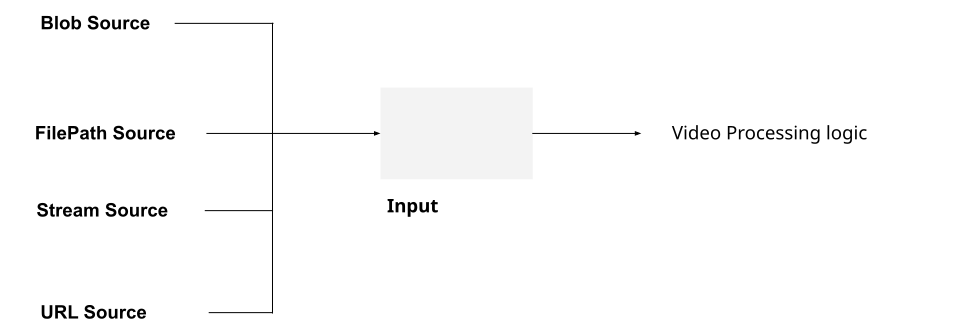
That makes it possible to maintain the same video processing logic regardless of where your video is coming from. For example, you could build a video player and maintain the same playback logic regardless of whether your video is cached locally or coming from a remotely hosted url.
The “where your video” is coming from is encapsulated by the source parameter for the Input constructor, as below:
import { Input, ALL_FORMATS, BlobSource } from 'mediabunny';
const input = new Input({  formats: ALL_FORMATS,  source: new BlobSource(file),});
Outputs
Section titled “Outputs”Likewise, Outputs are a wrapper around wherever you might write a file to, whether that’s an ArrayBuffer (in memory), a local file (for serverjs environments) or a write stream.
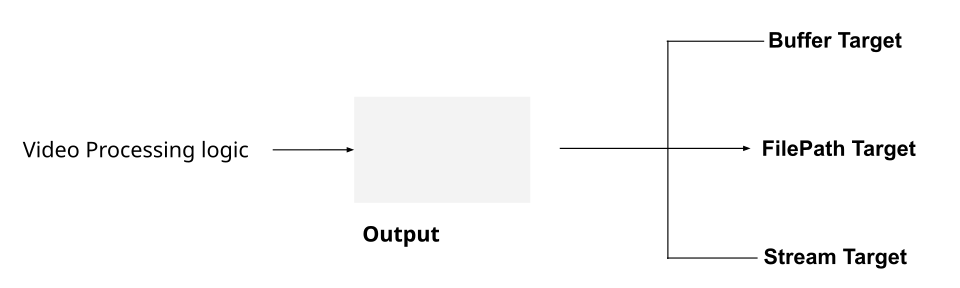
The API is likewise similar for output, but here, the ‘wherever you might write a file to’ is encapsulated by the target parameter.
import { Output, Mp4OutputFormat, BufferTarget } from 'mediabunny';
const output = new Output({  format: new Mp4OutputFormat(),  target: new BufferTarget(),});
This way, you can maintain the same processing logic regardless of where your file is being written to.
Tracks
Section titled “Tracks”WebCodecs never explicitly define or work with Tracks, like a file’s Audio or Video tracks, even if other Web APIs do. Mediabunny explicitly deals with tracks, facilitating reading and writing data to/from files and streams.
// We'll need this to read video dataconst videoTrack = await input.getPrimaryVideoTrack();And we’ll also write to output tracks, e.g.
output.addVideoTrack(videoSource); // We'll get to this nextMedia Sources and Sinks
Section titled “Media Sources and Sinks”Mediabunny introduces a new concept called Sources and Sinks. A Media Source a place where you get video from, and a Media Sink is where you send video to.
MediaSource
Section titled “MediaSource”A media source is where you’d get video from, like a <canvas> or a webcam, and a Media Source is what you would pipe to an Output.
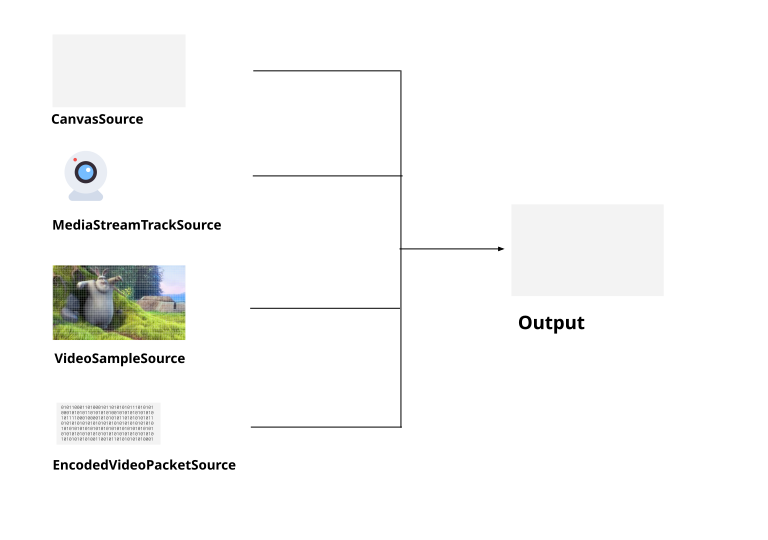
So to record a <canvas> to file, the setup to pipe the canvas to the file would look like this
import { CanvasSource, Output, Mp4OutputFormat } from 'mediabunny';
const videoSource = new CanvasSource(canvasElement, {codec: 'avc',bitrate: 1e6});
const output = new Output({  format: new Mp4OutputFormat(),  target: new BufferTarget(),});
output.addVideoTrack(videoSource);
Then actually recording a canvas would look something like this:
await output.start();for (let i=0; i < 10; i++){ //Grab 10 frames a 100ms intervals videoSource.add(i*0.1, 0.1); //timestamp, duration await new Promise((r)=>setTimeout(r, 100));}await output.finalize()MediaSinks
Section titled “MediaSinks”A Media Sink is where you’d send video or audio to. You would usually pipe an Input to a MediaSink.
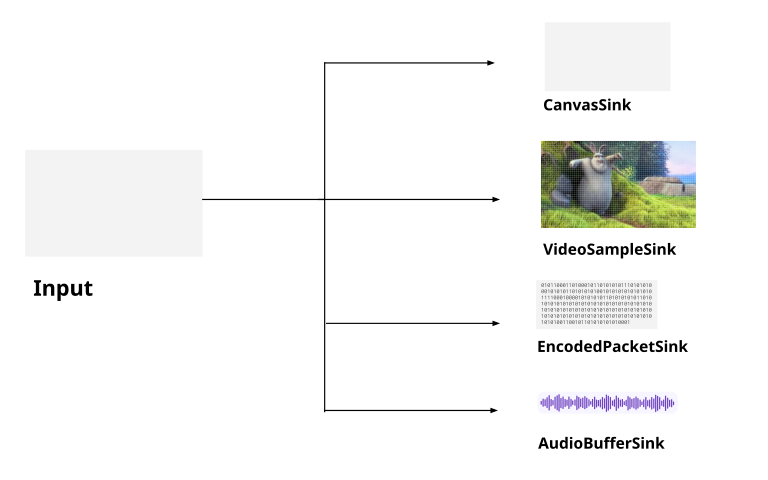
One really nice advantage of Mediabunny is efficiently handling the WebCodecs to WebAudio interface, handling the direct conversion to AudioBuffer objects and facilitating playback of audio in the browser.
Here’s how you’d play back audio in the browser from a video file, by connecting an input to AudioBufferSink
import { AudioBufferSink } from 'mediabunny';
const audioTrack = await input.getPrimaryAudioTrack();const sink = new AudioBufferSink(audioTrack);
for await (const { buffer, timestamp } of sink.buffers()) {  const node = audioContext.createBufferSource();  node.buffer = buffer;  node.connect(audioContext.destination);  node.start(timestamp);}
Packets and Samples
Section titled “Packets and Samples”Mediabunny also uses slightly different terminology from WebCodecs. Whereas WebCodecs has VideoFrame and AudioData for raw video and audio, Mediabunny uses VideoSample and AudioSample. Here’s a quick table comparing the terminology
| WebCodecs | Mediabunny | |
|---|---|---|
| Raw Video | VideoFrame | VideoSample |
| Raw Audio | AudioData | AudioSample |
| Encoded Video | EncodedVideoChunk | EncodedVideoPacket |
| Encoded Audio | EncodedAudioChunk | EncodedAudioPacket |
These are mostly comparable, and you can easily convert between the two using the following methods
| WebCodecs -> Mediabunny | Mediabunny-> WebCodecs | |
|---|---|---|
| Raw video | new VideoSample(videoFrame) | sample.toVideoFrame() |
| Raw audio | new AudioSample(audioData) | sample.toAudioData() |
| Encoded Video | EncodedPacket.fromEncodedChunk() | packet.toEncodedVideoChunk() |
| Encoded Audio | EncodedPacket.fromEncodedChunk() | packet.toEncodedAudioChunk() |
This is helpful as WebCodecs primitives like VideoFrame are not defined in server runtimes like Node, but Mediabunny works just fine. It also allows you to work with a common type for raw audio (AudioSample) instead of juggling two redundant APIs like AudioBuffer (for WebAudio) and AudioData for WebCodecs.
For Loops
Section titled “For Loops”As I’ve discussed several times, with WebCodecs you can’t treat encoding and decoding as a simple per frame operation [1]
//Pseudocode. This is NOT how transcoding worksfor (let i=0; i< numChunks; i++){ const chunk = await demuxer.getChunk(i); const frame = await decoder.decodeFrame(frame); const processed = await render(frame); const encoded = await encoder.encode(processed); muxer.mux(encoded);}Instead, you need to treat them as a pipeline, with internal buffers and queues at each stage of the process [2].
Mediabunny abstracts the pipeline complexity away, enabling you to actually perform per-frame operations:
import { BlobSource, Input, MP4, VideoSampleSink } from 'mediabunny';
const input = new Input({    formats: [MP4],    source: new BlobSource(file),});
const videoTrack = await input.getPrimaryVideoTrack();
const sink = new VideoSampleSink(videoTrack);
// Loop over all framesfor await (const sample of sink.samples()) {    const frame = await sample.toVideoFrame(); //Do something with the frame}
I’m not trying to be pedantic with this guide, treating video processing as a pipeline is best practice. Mediabunny actually does use the Streams API under the hood, but uses clever architecture to simplify the API so that you can treat it as an async per-frame operation and not worry about buffer stalls or memory management.
Other differences
Section titled “Other differences”A few other differences to note compared to WebCodecs:
-
Mediabunny uses seconds, not microseconds for all timestamps and durations
-
Mediabunny works with MP3 files
-
You don’t need to specify fully qualified codec strings, just the codec family (e.g.
avcinstead ofavc1.42001f)
A concrete example
Section titled “A concrete example”With the core concepts covered, perhaps the easiest way to understand Mediabunny is to see a working end to end example. To that end, we’ll use Mediabunny to transcode a video file, just re-encoding the video track and passing through the audio without re-encoding.
import { BlobSource, BufferTarget, Input, MP4, Mp4OutputFormat,Output, QUALITY_HIGH, VideoSample, VideoSampleSink, EncodedAudioPacketSource } from 'mediabunny';
async function transcodeFile(file: File): Promise <ArrayBuffer> {
    const input = new Input({        formats: [MP4],        source: new BlobSource(file),    });
    const audioTrack  = await input.getPrimaryAudioTrack();    const videoTrack = await input.getPrimaryVideoTrack();
    const output = new Output({        format: new Mp4OutputFormat(),        target: new BufferTarget(),    });
    const videoSource = new VideoSampleSource({        codec: 'avc',        bitrate: QUALITY_HIGH,        keyFrameInterval: 5,    });
    const audioSource = new EncodedAudioPacketSource(audioTrack.codec);
    output.addVideoTrack(videoSource, { frameRate: 30 });    output.addAudioTrack(audioSource);
    const sink = new VideoSampleSink(videoTrack);    const audioSink = new EncodedPacketSink(audioTrack);
    // Loop over all frames, with re-encoding    for await (const sample of sink.samples()) {        videoSource.add(sample);    }    // Pass audio without re-encoding    for await (const packet of audioSink.packets()) {        audioSource.add(packet);    }    await output.finalize();    return output.target.buffer}